AMIMIFX · MT5 · Version 1.02
Find the biggest movers.
Check their direction.
A separate scanner EA that ranks observed volatility, measures indicator strength and opens charts when you click a symbol. It does not place orders or manage positions.
Historical projections on clicked charts
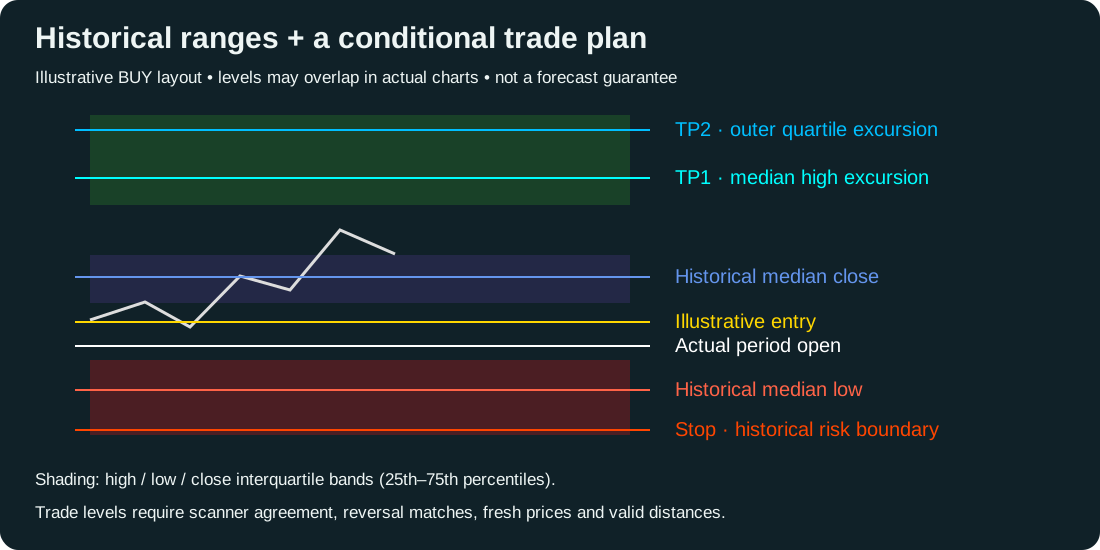
Click an instrument in the scanner. Its chart opens with an AMIMIFX historical overlay. Keep the scanner running: it maintains opened-chart overlays, refreshing one chart per timer event, no more frequently than every 15 seconds per chart. Removing the scanner removes its overlays. Existing chart EAs and other objects are preserved. Changing the opened chart's timeframe recalculates the projections on the next refresh.
Actual period open anchors projected prices. Historical median high, low and closing prices appear as labeled lines. Colored bands show each distribution's 25th–75th percentiles. These are separate empirical distributions, not a 50% guaranteed future envelope. Four chart bars are used by default: M15 projects a one-hour period beginning at the current M15 bar's open. This is not four bars from the click time.
Entry, Stop, TP1 and TP2 appear only with a current scanner Buy/Sell, enough agreeing reversal-time matches, a fresh quote and valid target distances. Entry is the latest ask for Buy or bid for Sell. TP1 is the median high/low excursion; TP2 the outer quartile; Stop uses the opposite outer quartile. Sell exits include an estimate using the current spread. Prices are illustrative chart levels, not broker-ready orders; no trades are submitted. Targets already behind entry or too close to entry are withheld. The scanner recommendation row remains independent, so the chart can say Wait even when the scanner row says Buy or Sell.
Reversal-time matching uses Master v16.19's sequence of confirmed swing clock times and its next-low=Buy / next-high=Sell convention. Confirmation bars must be closed. Historical outcomes must precede the full current swing query. SwingStrength defaults to 5 and SwingTests to 2. Directional match percentages are descriptive frequencies, not trade win probabilities. Matching samples can share parts of history and are not independent trials.
Range samples use completed, contiguous historical periods starting at the same broker-clock hour and minute on the same chart timeframe. Their percentage changes from historical opens are applied to today's period open. If at least the minimum sample count also matches the current confirmed swing sequence, the overlay uses that subset and labels it “time + swing sequence.” Otherwise it explicitly uses “time-of-day only.” Reversal-time agreement remains a separate requirement for a displayed trade plan; fallback ranges are not described as reversal-conditioned. Historical gaps are rejected. Broker clock changes can affect clock matching; the Eastern setting changes displayed timestamps, not historical matching.
| Input | Default / purpose |
|---|---|
| DrawHistoricalProjections | True; draw overlays on scanner-opened charts. |
| ProjectionHistoryBars | 20,000, maximum 100,000; limited by available broker history. |
| ProjectionHorizonBars | 4 bars of the opened chart timeframe, adjustable 1–96. |
| ProjectionMinSamples | 10 completed samples before ranges are shown. |
| ProjectionMinPatternMatches | 3 reversal-time matches required for a plan. |
| ProjectionPatternAgreement | 60% directional agreement required for a plan. |
| ProjectionSameWeekday | False; enable to restrict range samples to the same weekday. |
| ProjectionBarsBack | 6; extend level lines backward this many chart bars. |
Supported timeframes are intraday through D1. Sparse matches or unavailable history show Wait. Projections update as the period changes; they are not locked-in signals. No out-of-sample forecast accuracy or profitability has been established. Full live chart rendering and broker-history verification remain pending.
What this release includes
Scanner 1.02 uses your MT5 broker’s prices and historical bars. CoinGlass, futures open interest and liquidation heatmaps are not connected in this release. The optional media helper is only needed for video; WAV alerts work directly in MT5.
Quick start
- In MT5, select File → Open Data Folder.
- Copy
AMIMIFX_Volatility_Scanner_v1.02.ex5intoMQL5/Experts. The member package contains the compiled EA; EA source is not distributed. - Refresh Navigator. Open a separate chart and attach the scanner from Expert Advisors. One EA runs on each chart, so keep Master on its own chart.
- Make the instruments you want visible in Market Watch. The default scans Forex instruments from that list.
- Wait for the scan and history-loading retries to finish. Click any symbol button to open its M15 chart.
Highlighted signals, prices and time
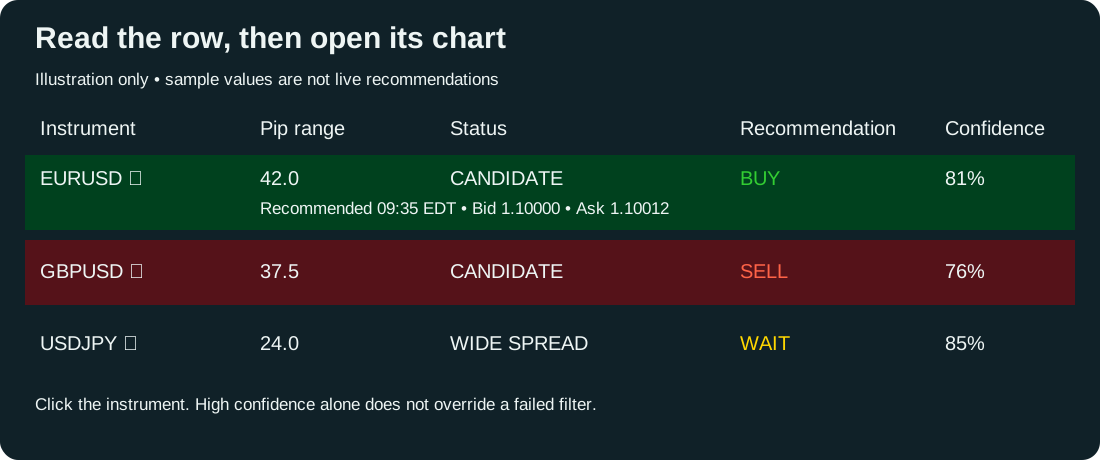
Buy rows are highlighted dark green; Sell rows dark red. Under each qualifying row, the scanner prints the recommendation time and the bid/ask captured at that completed scan. These are a snapshot, not a live quote. Wait rows show dashes. A new completed scan creates a new snapshot; alert suppression does not suppress the snapshot.
RecommendationTimeZone: Eastern (default, automatic current US daylight-saving rules), UTC, computer local time, or a custom UTC offset in minutes. For example +330 is India, -300 is a fixed UTC-5. Computer time must be correct. Eastern uses EDT/EST labels.
Choose which instruments alert
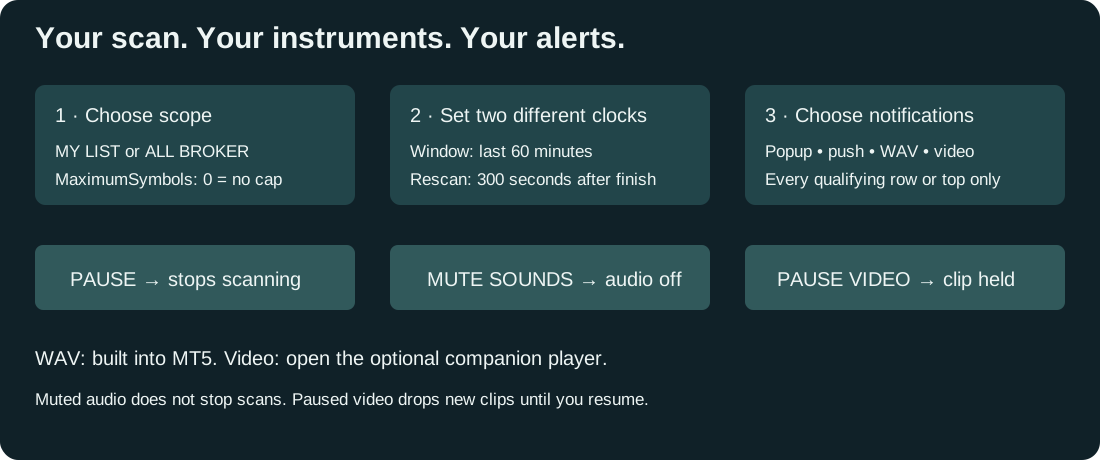
Use the SCOPE: MY LIST / ALL BROKER button or AlertScope in Inputs. My List follows Universe, CustomSymbols, ExtraSymbols and AssetFilter. All Broker includes every available broker symbol regardless of asset filter. MaximumSymbols still applies: the default is 100; set 0 for no cap. Omitted symbols are counted on screen and are not scanned or alerted. Scanning all symbols can take a long time while history and indicators load.
AlertTargets defaults to every qualifying instrument; select ALERT_TOP_ONLY for just the highest-ranked qualifying mover. Each instrument has its own duplicate suppression and cooldown. AlertEveryScan allows repeated signals after cooldown. Signals arriving together produce one combined popup/WAV/video event, with the first signal and a count of the others; every individual signal is printed in MT5's Experts log and appears in the rows. The scope button changes this session's scope; Inputs set the startup default.
WAV sound and mute
Enable SoundAlerts and set AlertSound to your chosen WAV filename in MT5's Sounds folder. MUTE SOUNDS stops the current WAV and silences subsequent scanner sounds and companion-video audio; UNMUTE restores them. It does not disable popups or push notifications, nor silence MT5's own separately configured notification sounds.
Video alerts
- Extract the entire package to a writable folder and double-click Start_AMIMIFX_Media_Player.cmd.
- Click Choose video, select a local MP4/WMV or another Windows-supported video, and use Test video to check playback.
- Enable VideoAlerts in scanner Inputs. Keep the companion player open. The default MediaChannel is Scanner1; for multiple scanner instances, give each a unique channel and launch its player with the matching -Channel argument.
- PAUSE VIDEO pauses playback and suppresses new clips until resumed. Resume continues the current paused clip; signals received while paused are not queued. The player also has local pause/mute controls; either its local controls or the scanner controls can keep media paused/muted.
The player remembers the selected file beside its script. No DLL permission is required in MT5. The bridge uses MT5's Common/Files folder. On startup the player ignores the previous signal, so old alerts do not replay. One clip plays per alert batch; the next batch restarts it. Media playback depends on installed Windows codecs; playback errors appear in the player. WAV, video, and live broker behavior need a live terminal test; the Strategy Tester does not reproduce these features.
Recommendation and confidence
The final two columns show Recommendation and Confidence. Buy (green) means upward signals pass all filters; Sell (red) means downward signals pass all filters. Wait (yellow) means a filter fails, the scan is pending or paused, or data is unavailable. MinimumAlertStrength sets the confidence threshold for both recommendations and alerts (default 60%). Confidence is weighted indicator agreement, not win probability or Master CONF. A Wait row can have high confidence when another filter blocks it. Missing or pending data displays --.
Maximize the chart to at least 1260 pixels wide to see all columns. Timeframe scores run from -7 (downward) to +7 (upward).
Read the scanner
| Field | Meaning |
|---|---|
| Range leader | The largest observed high–low range among symbols with valid data, regardless of indicator qualification. |
| Alert candidate | The largest range among symbols meeting your strength, spread and minimum-range filters. It may differ from the range leader. |
| Pip Range* | Highest price minus lowest price over the measurement window. Forex uses pips; other instruments use broker points. |
| Net Move* | Last close minus the first open over the same window. This signed number shows net movement, which can be much smaller than the range. |
| Range % | Range divided by the window's opening price, expressed as a percentage. |
| Confidence | Weighted indicator direction UP/DOWN/MIXED and normalized strength from 0 to 100. |
| H4 Score / H1 Score / M15 Score / M5 Score | Each timeframe's score from −7 to +7. Opposing signs indicate disagreement. |
| Spread* | Ask minus Bid, in the row's pip or point units. |
| Scan Status | CANDIDATE, WEAK/MIXED, WIDE SPREAD, SMALL RANGE, STALE/CLOSED, or waiting for history/indicators. |
Hover over a symbol for its price units. Forex-only lists default to descending pip range. Lists containing any non-Forex instrument automatically use percentage range for range ranking, because pips and broker points are not comparable across different markets. Pip distance is also not cash profit.
Set the window and scan interval
| Input | How to use it |
|---|---|
| MeasurementWindow | WINDOW_ROLLING (default), WINDOW_CLOCK_HOUR, or WINDOW_SESSION. |
| RollingMinutes | 60 by default; choose 1–1,440 minutes. |
| SessionStartHour / SessionEndHour | Broker server hours, 0–23, with distinct start/end. Overnight sessions such as 22 → 6 work. Outside that session, scanning waits. |
| ScanIntervalSeconds | 300 = five minutes; 60 = one minute; 900 = 15 minutes; 1,800 = 30 minutes; 3,600 = one hour. Accepted range: 10–86,400 seconds. |
Measurement window and scan interval are different. A 60-minute window rescanned every five minutes compares the most recent completed 60 minutes each time. The next interval begins when the current scan finishes; scans never overlap. All symbols use the same completed-minute range endpoint. In current-hour/session mode, the first minute must finish before a range is available. This scanner ranks observed movement; it does not predict which symbol will move most in the next hour.
Choose instruments
- UNIVERSE_MARKET_WATCH: scans your visible Market Watch list. ASSETS_FOREX is the default; ASSETS_ALL and ASSETS_NON_FOREX are available.
- UNIVERSE_CHART_CURRENCY: scans the broker's Forex symbols sharing the current chart's quote currency. On USDJPY this is the JPY family, not a statistical correlation test.
- UNIVERSE_CUSTOM: scans the comma-separated CustomSymbols list, using exact broker symbol names.
- ExtraSymbols: manually adds symbols in any mode, including exceptions to the asset filter.
Click RELOAD LIST after changing Market Watch. MaximumSymbols defaults to 100; choose a positive limit or 0 for no cap. Any symbols omitted by this cap are counted visibly; narrow the list or raise the cap to include them. Large universes need more memory and history. The scanner selects requested symbols in Market Watch so MT5 can load their data.
Indicator strength
The per-timeframe votes match Master 16.19's EMA/RSI/momentum core: fast EMA above/below slow EMA is ±3; close above/below fast EMA is ±2; RSI ≥55 or ≤45 is ±1; momentum above/below 100 is ±1. Defaults are EMA 20/50, RSI 14 and momentum 14. H4/H1/M15/M5 weights default to 2.5/2/1/0.5.
The absolute weighted vote divided by its maximum possible magnitude becomes strength /100. Opposing timeframes cancel part of that score. This is not Master's full CONF calculation, its dynamic weighting, or a probability of winning. Closed indicator bars are used by default. Set UseClosedIndicatorBars=false for live-bar scores that can change before the bar closes.
Configure alerts
- MinimumAlertStrength: 60/100 by default; raise it for stronger directional agreement.
- MinimumAlertRangePips: optional minimum range for Forex rows, default 0.
- MaximumSpreadRangePct: default 15%; rejects candidates whose spread exceeds this fraction of the observed range.
- AlertEveryScan=false: suppresses repeat alerts for each instrument and direction within the same hour; for session mode, the session start is the time bucket.
- AlertCooldownSeconds: 300 by default, tracked separately for each instrument. With AlertEveryScan=true, cooldown still applies.
- PopupAlerts / PushAlerts / SoundAlerts: popup and WAV sound default on; push defaults off. Push requires MT5 notification setup; sound uses the selected MT5 WAV file.
Alerts are evaluated only after a scan finishes. If no symbol qualifies, there is no candidate alert. Lowering the strength threshold does not admit stale quotes, invalid history or a wide spread. Alerts do not apply Master's news, session-eligibility or trade-risk filters.
Buttons and chart opening
SCAN NOW starts a new scan when idle. PAUSE/RESUME stops/restarts scanning. RELOAD LIST refreshes membership. SORT cycles range, percentage range and indicator strength. < / > pages through results. Sorting by strength changes the table order; the alert candidate remains the highest qualifying range.
Click a symbol to open its chart at OpenChartTimeframe (M15 default). An existing matching chart is reused when UseExistingChart=true. The scanner's own chart is preserved; opening a chart does not attach an EA, load a template or place a trade. Widen the scanner chart to at least 1260 pixels to see the full table.
When data is missing
WAIT M1 HISTORY means the requested minute range is incomplete. The default requires at least 90% minute coverage and recent endpoints. Sparse-tick instruments may fail that condition even if MT5 has all available bars. WAIT INDICATORS means the four timeframes need more data. STALE/CLOSED means the quote is older than QuoteMaxAgeSeconds (120 default). Invalid rows do not become leaders.
Keep MT5 connected and allow history to load, then use SCAN NOW. Results remain a snapshot of the last completed scan between scheduled runs. They do not update continuously when idle.
Validation
Compiled with zero errors and zero warnings. 49 scanner/projection checks against extracted production functions cover direction votes, ranking, range versus net movement, closed-minute windows, overnight sessions, stale quotes, incomplete history and alert suppression. No trading calls are present. Live broker loading, chart layout, notifications and click-to-open behavior still require terminal verification; no trades were placed during development.