LPS Price + Margin Alert 5.00
Multiple chart-price alerts plus an independent account margin-level alert.
Install and open
- Download the tool from the member downloads page and extract the ZIP.
- In MT5, select File → Open Data Folder. Copy the supplied MQL5 folders into that folder.
- Refresh Navigator and attach the EA from Expert Advisors to a demo chart. MT5 runs one EA per chart; use separate charts for separate EAs.
- Review Inputs before allowing trading. Check the Experts log after attaching.
Add and move price alerts
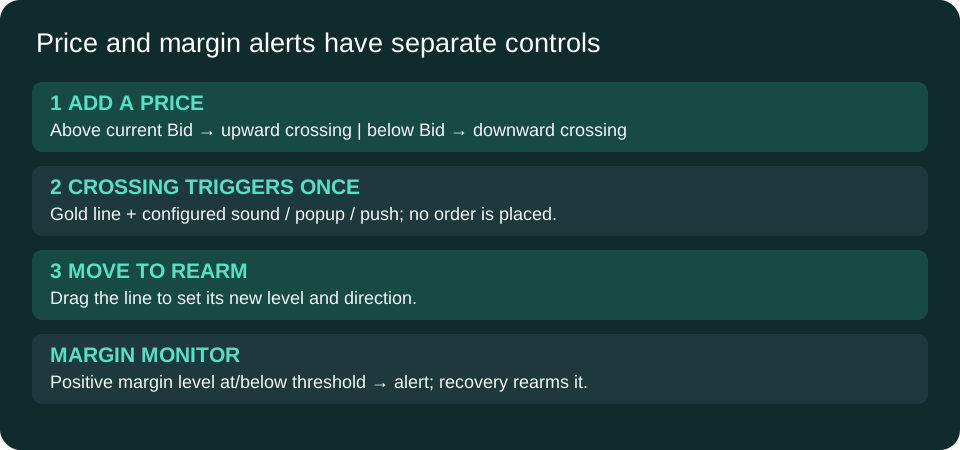
- Enter a positive price and click ADD ALERT.
- The tool assigns ABOVE or BELOW relative to the current Bid. Default colors are green above, tomato below and gold after triggering.
- Wait for Bid to cross the level from the opposite side. Merely attaching at a price already beyond the level does not create a crossing.
- Drag a registered alert line to change its level and rearm it; direction is recalculated relative to current Bid.
AutoArmDrawnLines=true adopts newly drawn horizontal lines, replacing them with registered alert objects. Turn it off if other tools create horizontal lines on the same chart. Existing lines are not automatically reconstructed as armed alerts after an EA reload; add or redraw the levels you intend to monitor.
Panel buttons
| Control | Behavior |
|---|---|
| DISARM ALL / ARM ALL | Pauses/resumes price checks. Triggered price lines remain one-shot until moved. Margin monitoring has its own switch. |
| SILENCE / UNSILENCE | Controls sound only; popup and push settings remain independent. |
| NEXT SOUND / TEST SOUND | Cycles five configured slots and tests the selected WAV. |
| CLEAR TRIGGERED | Deletes triggered registered lines. |
| DELETE ALL ALERTS | Deletes all registered alert lines immediately. |
| MARGIN ON / OFF | Toggles the separate margin monitor and reads the entered positive threshold. |
Margin alerts
Default threshold is 150% account margin level. Enter the threshold, then toggle the margin button to apply it; if that leaves the monitor OFF, toggle it back ON. Triggering occurs at or below the threshold, provided MT5 reports a positive margin level. Recovery above the threshold rearms the alert. N/A is shown for a nonpositive level. This tool does not close trades or reduce exposure.
Sound and notifications
Version 5.00 calls Windows winmm.dll and plays the selected file from the terminal Data Folder under MQL5/Sounds. Windows and DLL permission are required for this playback method. Supply your own WAV files; custom audio is not included in the download. Set Sound1–Sound5, choose StartSound, and click TEST SOUND. Empty slots and failed playback appear in the panel status. Popup defaults on; Push defaults off and requires MT5 notification setup.
What it does not do
This is an alert-only EA. It does not place orders, add stops or close positions. It checks on ticks and a one-second timer. Keep the terminal and chart running; price checks use Bid, not Ask. The build compiles with zero errors and warnings; audio, push and broker behavior still require terminal testing.